Tip 01 · Requirements
Do you want to save on your efforts and get to know what the end user really wants?
You have been asked to implement some program and you have been brainstorming. You got all kinds of ideas of how the user might be helped by adding this and that. You have taken into account all kinds of scenarios and provided lots of parameters.
Well, let me tell you that most probably you are over providing. Your imagination produced all these ideas, but they are not necessarily what the user needs.
Chances are that the user does not know what he really needs until you show him something. Save on your efforts. Produce a working prototype. Show it to the end user. Take note of his observations and ideas, so that you can come up with things that are really useful for him.

Recommended Read
Soft Skills: The Software Developer's Life Manual
Career, productivity, and life advice for every coder
View on Amazon →
Tip 02 · Agreements
Do you want to avoid misunderstandings about what a program should do?
Has it ever happened to you that you spent some good time implementing things, and then showed your creation to the user only to find out that it was not exactly what they wanted?
To avoid such surprises, put everything in black and white. Do a profound analysis. Write an outline of what the program will do, what screens and reports you will create. Let this be reviewed by the end user.
Obtain a formal agreement from the user — a hand-written signature or at minimum a confirmation email. Just make sure that you have something to show him or others to prove what you agreed on.
📖
Amazon Search
Browse "Tips for Programmers" Books on Amazon
Search Amazon Now →
As an Amazon Associate I earn from qualifying purchases.
Tip 03 · Testing
Do you want to avoid that your program fails on its first demonstration?
Ok, you have just finished squeezing the best of the best out of your brain. The program is finished! Now you are all excited and ready to show your new baby to the world, right? Wrong.
Before you start screaming and inviting over everybody, test your product yourself. Put yourself in the shoes of the end user. Make sure that you try out everything very thoroughly.
Do not assume that because you consider yourself some kind of programming genius everything you spit out will work as expected. Make sure to deliver quality! No matter how small a change you make to a program, test it.

Certification Prep
Unity Certified Programmer: Exam Guide
Pass the Unity certification exam on your first attempt
View on Amazon →
Tip 04 · Debugging
Do you want to find bugs really fast?
First admit that you are not perfect and that there may be mistakes in your own programs. When you must find a bug, you need to narrow down to the exact spot where things go wrong.
Insert code to show messages throughout your program. Or use a debugger to trace the execution path. Then apply the binary search method:
- Find the spot in your code about halfway the supposed execution path.
- Put in a message or trace point and find out if the error occurs before or after that spot.
- Repeat the process, narrowing down on the half where you suspect the error.
- Depending on the program size, you should find the exact error spot in just a few to a few tens of steps.
If you were testing with large inputs then test first with few inputs only. Gradually add more. Temporarily comment out parts of your code.
Tip 05 · Environment Bugs
Do you know what to do when the logic is right but it still doesn't work?
I remember when I was implementing a program for my thesis. In one of my routines the program did not behave as expected. I tested and tested again. The programming logic looked fine, but it did not produce the expected result.
After thorough testing and thinking out of the box I found that a specific variable was being overwritten unexpectedly — the code generated by the compiler itself was faulty.
Do not take for granted that the programming environment you work with is 100% trustworthy. If you are facing an unexplainable programming error then do some specific testing to see if the code generated by your programming environment is ok.
Tip 06 · Reuse
Do you want to save lots of time when producing programs?
Often when you must produce a new program or add something to an existing one you will find that it is similar to something you have done before. Or someone in your company did something similar before.
Do not reinvent the wheel every time. Look through what you or others have programmed before and find what is most similar to what you need now. Copy it and modify the copy. This can save you enormous amounts of time.
Beginner Friendly
Programmer's Motivation for Beginners: Real Learning Stories & Tips
Inspiring stories that keep you coding when it gets hard
View on Amazon →
Tip 07 · Ideas
Do you want to avoid forgetting good ideas and make better use of them?
Use sheets of paper or a document on your PC to take note of all ideas that pop up in your mind. Write down all your ideas the very moment they occur to you. Do not rely on your memory alone. Often you have a good idea and later you cannot remember exactly what it was.
Review your idea sheets from time to time and implement each one of the ideas that you have written down. Check off the ideas that you have already implemented.
Highly Rated
The Best Ever Book of Money Saving Tips for Computer Programmers
Spend less, earn more — practical financial advice for devs
View on Amazon →
Tip 08 · Incremental Dev
Do you want to minimize the introduction of errors in your program?
If you are working on a very large program, implement it step by step.
Do not make the mistake to implement everything and then test it as a whole. Make small changes, test them, and make corrections if necessary. Then make more small changes. If you implement everything and then test it all at once you will have a hard time finding where exactly the errors are.
Language Guide
Java Programming for Beginners: Learn Java from Scratch
The clearest path from zero to writing real Java programs
View on Amazon →
Tip 09 · Task Tracking
Do you want to make sure you did all that needed to be done?
Make use of special purpose project management software tools if you or your company can afford it. Otherwise, at least write down all you need to do on paper and check off the things you already did.
Or use a text editor with a simple convention:
+ this thing left to do
ok. this issue was handled
+ another thing to do
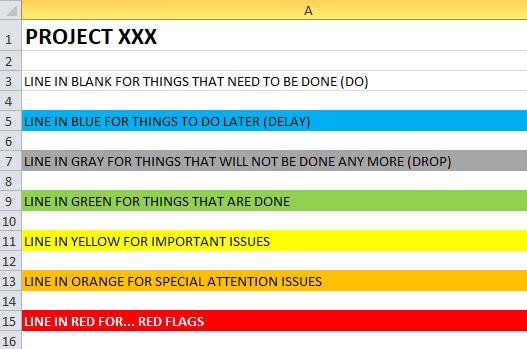
Or use an Excel sheet with color coding — tasks to do (blank), to do later (blue), no longer needed (grey), and done (green).
Tip 10 · Time Logging
Do you want to be prepared to defend yourself when asked what you have been doing?
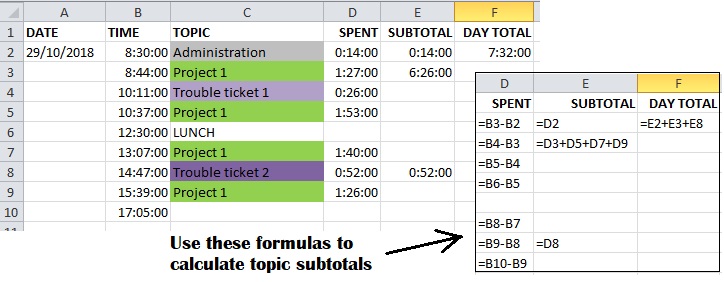
Keep a log of everything you do in a text file or in Excel. Each time you start to work on a new topic or project part or support ticket, write down the start time and what it was.
If you use Excel, use formulas to calculate the time you spent on each issue. This may also help you to fill in a time log if your company requires you to do so.
🎓
Amazon Search
Search "Learn Programming" Books on Amazon
Find Books Now →
As an Amazon Associate I earn from qualifying purchases.
Tip 11 · Focus
Do you want to stop daydreaming and get to do the real job?
Maybe you would rather relax in your hammock, or watch television, or surf the net. Then when you really get to sit behind your computer, your mind is still traveling.
Stop postponing. Get over your internal resistance, your fatigue, your depression, your laziness — whatever it is that keeps you from being productive. Concentrate and do the real work.
Tip 12 · Getting Started
Do you know what to do if you do not know how to start programming?
If you are just sitting idle without knowing how to start the task at hand, then start by opening up the source file of the program that you must modify.
Review the source code in which you must make the changes. Try to understand what it does. Then start applying small changes and do some testing step by step. Get your feet in the water and the rest will follow.
Tip 13 · Know Your Tools
Do you want to guarantee getting the best out of your programming environment?
You really must know your programming language and your programming environment. Not everything is what it looks like or what it is named after. Sometimes the naming of things may mislead you.
Read the manuals so that you know what things were really meant for. Of course also be aware that manuals may be out of date, contain errors, or be incomplete. Study the manuals and apply common sense.
Tip 14 · Documentation
Do you want to prepare for the long-term maintenance of your program?
All the time while you are programming you are making decisions and compromises. Limitations of the programming environment may force you into specific workarounds or weird programming constructs.
Leave a trace of your thoughts and your decisions by commenting your code throughout. Also use significant identifiers in your code. This will be of great help for you if you have to come back weeks, months or even years later to make changes.
Tip 15 · Persistence
Do you know how to proceed when you are completely stuck?
Sometimes it seems you just cannot get things to work. Try to find a workaround. Try again and again. Do not give up.
Try different combinations of parameters of your environment. Take a break. Try again later. Try again the next day or next week. Think about what could be the reason that something is not working. Push through, do not give up.
Tip 16 · Community
Have you thought about learning from other people or asking for help?
Read books about your problem at hand. Consult with fellow programmers. Research the internet. Launch a question at Experts Exchange. If you can afford it, sign up for their premium service. Their experts have helped me out several times.
Tip 17 · Design Principles
Have you seen these software design principles and decided how to apply them?
When you have tough software design decisions ahead, here is a small collection of principles I encountered over the years. Take your time to investigate them all:

Hot Right Now
Python Programming for Beginners
The most in-demand language — start here
View on Amazon →
Legacy · University Textbooks
Do you want to know from which books I learned to program at Brussels Free University?
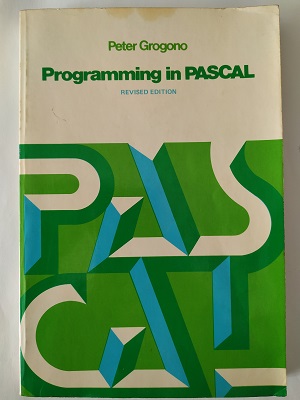
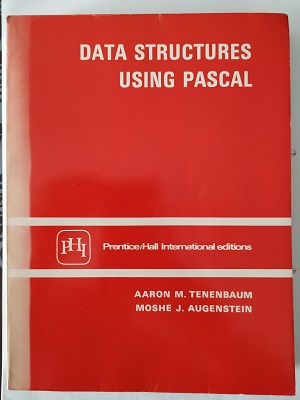
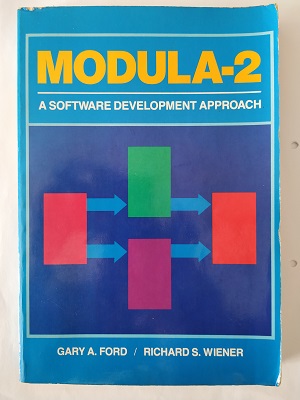
In my first year we learnt Pascal programming using Programming in PASCAL by Peter Grogono. Data structures were covered in Data Structures Using Pascal by Tenenbaum & Augenstein. In my second year I learnt modular software development in Modula-2 using the textbook by Ford & Wiener.
Tip 18 · Faith
Have you thought about asking the One True God for help?
This tip is for Christians only! If you do not yet believe in the Lord Jesus Christ, I kindly invite you to visit my website where you can read my testimony and so much more!
If you are a Christian programmer, use prayer. Consult with the Master Programmer. Ask God to reveal how to design your programs. Ask the Holy Spirit: what do I do next? Then the ideas will flow. Just write them down and implement them!
Tip 19 · Christian Mindset
As a Christian, are you applying the right mindset to your programming job?
Joshua 1:9 — The Voice (VOICE)
This is My command: be strong and courageous. Never be afraid or discouraged because I am your God, the Eternal One, and I will remain with you wherever you go.
Colossians 3:23-24 — The Voice (VOICE)
So no matter what your task is, work hard. Always do your best as the Lord's servant, not as man's, because you know your reward is the Lord's inheritance.
Be available and committed in your job as a programmer!

Advanced · AI Focus
Advanced Python AI Programming
Level up to building real AI applications with Python
View on Amazon →
About the Author
How I became an Analyst Programmer
I am a Belgian citizen born near Brussels in 1966. I started programming on a Commodore 64 in 1983 — even writing Conway's Game of Life in machine code because BASIC was too slow. That passion led me to study Informatica at the Brussels Free University, where I graduated in 1988.
Since 1988 I have been working as an analyst and programmer in IT, mainly using Oracle databases and Oracle's Developer programming environment. In 1996 I moved to El Salvador and worked in IT at a bank and utilities company for 10 years. I moved back to Belgium in 2010.
You can view my full profile on LinkedIn and read my full Christian testimony at fireofthelord.org.

Free Community
Join the Tips for Programmers Community on Skool
Go deeper on every tip — debugging, productivity, code quality, design principles. Free to join.
Join Free →